javascript-obfuscator, the engine behind obfuscator.io, replaces the strings in a script with lookups into a shuffled array reached through an accessor function, then optionally encodes that array in base64 or RC4 and flattens the control flow. KlaroSkope reverses those layers statically, returning the program with its strings restored and a signal for whether the result is a complete decode or a partial one, and it does this by reading the script rather than executing it.
Fingerprint the build
Runs in your browser. The text you paste is not uploaded.Reports which javascript-obfuscator options the markers indicate: string-array rotation, base64 or RC4 encoding, control flow flattening, dead code, self defending. It identifies the build rather than decoding it, which is the question a static tool can answer honestly before you commit to a decode.
Worked examples
Synthetic samples. Each input decodes to the output shown, and the outputs are checked against the live engine before publication.
Example 1: String array with base64 encoding
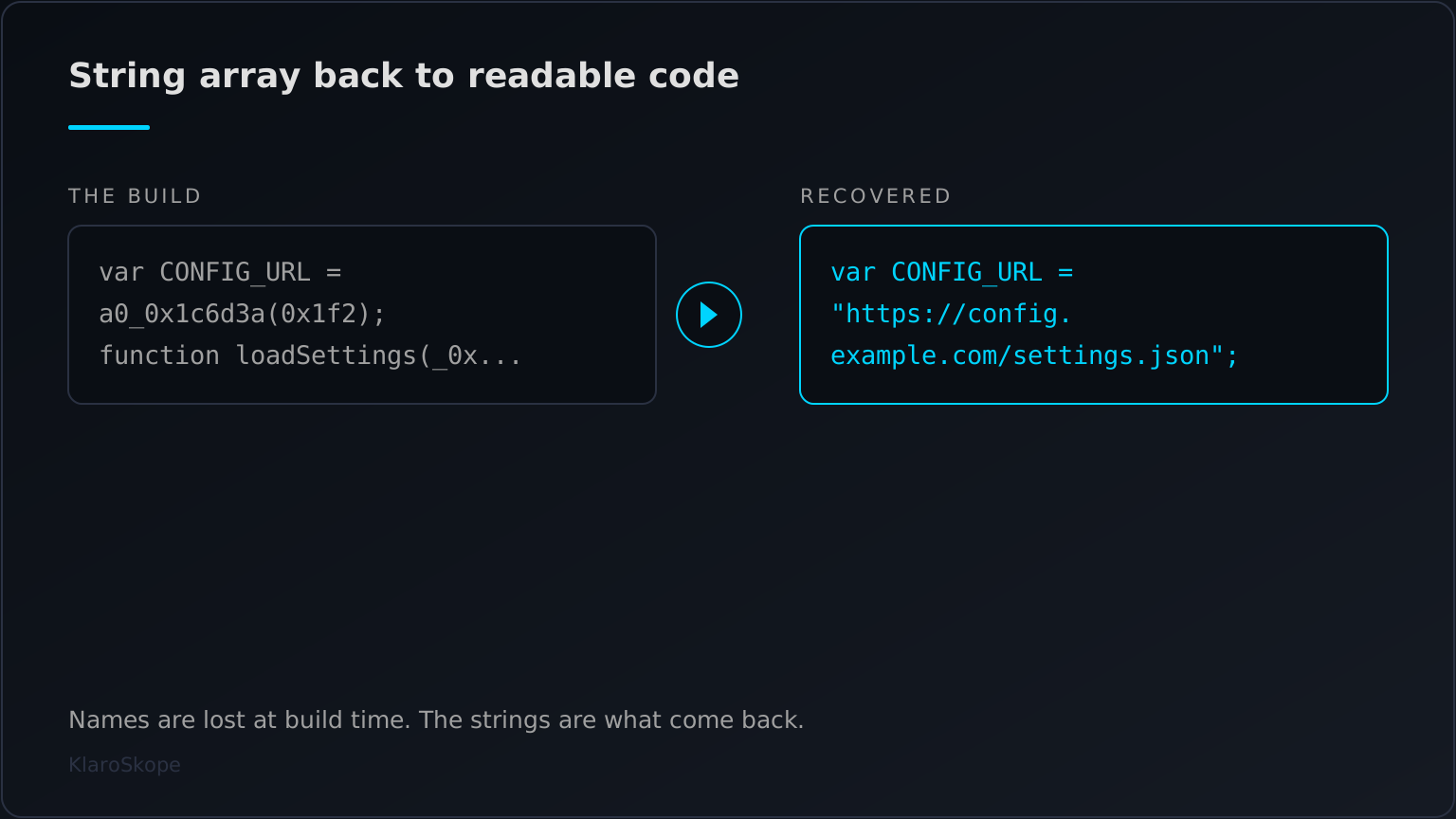
var a0_0x1c6d3a=a0_0x44f3;(function(_0x2f4214,_0x5b13b0){var _0x4f69f6=a0_0x44f3,_0x407915=_0x2f4214();while(!![]){try{var _0x53628d=-parseInt(_0x4f69f6(0x1f3))/0x1+-parseInt(_0x4f69f6(0x1ea))/0x2*(-parseInt(_0x4f69f6(0x1f1))/0x3)+parseInt(_0x4f69f6(0x1f0))/0x4*(parseInt(_0x4f69f6(0x1ec))/0x5)+-parseInt(_0x4f69f6(0x1f6))/0x6*(-parseInt(_0x4f69f6(0x1e9))/0x7)+parseInt(_0x4f69f6(0x1ef))/0x8+parseInt(_0x4f69f6(0x1e5))/0x9*(-parseInt(_0x4f69f6(0x1f7))/0xa)+-parseInt(_0x4f69f6(0x1ee))/0xb*(-parseInt(_0x4f69f6(0x1e8))/0xc);if(_0x53628d===_0x5b13b0)break;else _0x407915['push'](_0x407915['shift']());}catch(_0x330292){_0x407915['push'](_0x407915['shift']());}}}(a0_0xd573,0x997c4));var CONFIG_URL=a0_0
... (excerpt; the full sample is 2826 characters)var CONFIG_URL = "https://config.example.com/settings.json";
function loadSettings(_0xce57fe) {
fetch(CONFIG_URL)["then"](function(_0x114e9f) {
return _0x114e9f["json"]();
})["then"](function(_0x286d22) {
console["log"]("settings loaded from " + CONFIG_URL), _0xce57fe(_0x286d22);
});
}
loadSettings(function(_0x282114) {
console["log"]("theme: " + _0x282114["theme"]);
});
The default shape from the obfuscator.io web UI. The config URL survives in the string array rather than in the code, which is why the source reads as accessor calls and integers.
Example 2: Same program, RC4-encoded string array
var a0_0x387047=a0_0x3bf8;(function(_0x187536,_0x1a4d6c){var _0x5c669e=a0_0x3bf8,_0x18d8c2=_0x187536();while(!![]){try{var _0x241527=parseInt(_0x5c669e(0xb2,'Q^tC'))/0x1+parseInt(_0x5c669e(0xb6,'n(dy'))/0x2*(-parseInt(_0x5c669e(0xc2,')W@['))/0x3)+-parseInt(_0x5c669e(0xb7,')W@['))/0x4*(-parseInt(_0x5c669e(0xb3,'(*yM'))/0x5)+parseInt(_0x5c669e(0xc9,'a[Ey'))/0x6+-parseInt(_0x5c669e(0xca,'#c3t'))/0x7*(-parseInt(_0x5c669e(0xc1,'MVlZ'))/0x8)+-parseInt(_0x5c669e(0xba,'VdY6'))/0x9+parseInt(_0x5c669e(0xbf,'7m0S'))/0xa*(-parseInt(_0x5c669e(0xc8,'z&)N'))/0xb);if(_0x241527===_0x1a4d6c)break;else _0x18d8c2['push'](_0x18d8c2['shift']());}catch(_0x5764b7){_0x18d8c2['push'](_0x18d8c2['shift']());}}}(a0_0x12
... (excerpt; the full sample is 4303 characters)var CONFIG_URL = "https://config.example.com/settings.json";
function loadSettings(_0x33d8cc) {
fetch(CONFIG_URL)["then"](function(_0x185779) {
return _0x185779["json"]();
})["then"](function(_0x404861) {
console["log"]("settings loaded from " + CONFIG_URL), _0x33d8cc(_0x404861);
});
}
loadSettings(function(_0x5d24c7) {
console["log"]("theme: " + _0x5d24c7["theme"]);
});
The same source under the RC4 option. The accessor now takes two arguments, the second being the per-string key. The recovered program matches the base64 build line for line, apart from the generated identifier names, which differ because the two builds were produced in separate runs and those names are minted fresh each time.
What javascript-obfuscator actually does to a file
obfuscator.io is the hosted front end for javascript-obfuscator, an open source tool whose output is the obfuscated JavaScript an analyst meets most often. It is a legitimate product with legitimate users, and it is also the builder behind a large share of the obfuscated JavaScript that reaches an analyst. The core transformation is the string array. The tool lifts the string literals out of the program into one array, shuffles it, and replaces each original literal with a call to an accessor function that indexes the array with an offset. What is left behind reads as arithmetic and hexadecimal identifiers. On top of that base it layers options: rotation of the array by a self-invoking function, base64 or RC4 encoding of the entries, dead code injection, and control flow flattening that rewrites straight-line code into a dispatcher loop.
THE SAME LINE UNDER TWO STRING-ARRAY OPTIONS
--------------------------------------------
base64    var CONFIG_URL=a0_0x1c6d3a(0x1f2);
RC4       var CONFIG_URL=a0_0x387047(0xcb,'a[Ey');

recovered var CONFIG_URL = "https://config.example.com/settings.json";

The second argument under RC4 is the per-string key, which is why the
accessor signature changes while the recovered logic does not. Only the
generated identifier names differ between the two builds.
The reason this matters for triage is that the options compose, and each one moves the indicator further from the surface. A build with rotation and RC4 holds its URLs nowhere in readable form: the array entries are ciphertext, the order is wrong until the rotation function has run, and the accessor adds an offset that differs per build. Reading such a file by eye gives you the shape of the program and few of its facts, which is the intended effect.
Complete decode, or a partial one
The well-known open source deobfuscators for this builder are static rewriters that work on the parsed syntax tree, and they do a capable job on the string array. The question worth asking of any of them, and of this one, is not whether it returned something, but whether what it returned is the whole program. Tools differ in what they leave behind: some resolve the array and stop, leaving flattened control flow in place; some run the sample to reach further, which means executing hostile code; and some return a partial resolution that reads as finished because the lookups they could not resolve were quietly dropped. A result that looks like source but omits a branch is worse for an analyst than one that admits it is incomplete, because the omission is invisible at review time.
KlaroSkope decodes these files statically, without executing the sample, and reports whether the delivered program is a complete reconstruction or a partial one. Where the reconstruction is complete, the output is the program with its strings in place. Where it is partial, that is stated rather than papered over, and the layers that did resolve are still returned. There are builds this approach does not fully reduce, among them very large bundles above the input ceiling, damaged or truncated captures, and files whose remaining layer is an encrypted blob with the key held elsewhere. Those ceilings are worth knowing before a decode rather than after it.
Working with an obfuscator.io sample
- Submit the whole file rather than a fragment. The string array, the rotation function and the accessor sit in different parts of the script, and a decode that is missing one of them resolves fewer strings than the file actually permits.
- Do not run it to see what it does. Running is the one approach that reliably recovers a heavily layered build, and it is also the approach that carries out whatever the sample was written to carry out.
- Read the recovered program for the facts, not the names. Identifier names are lost at build time and are not recoverable, so the analysis targets are the restored strings: URLs, hosts, paths, keys and the API calls around them.
- Treat a partial decode as a partial decode. If the output still carries accessor calls or a dispatcher switch, some of the program is still hidden, and a rule written against what you can see may miss the branch you cannot.
Two sibling pages go deeper than this one. Decode obfuscator.io JavaScript: Option-by-Option Reference covers what each build option does and how to recognise it in a file, which is the page to read when you are identifying a build rather than decoding one. Decode JavaScript String-Array Obfuscation covers the string-array mechanism itself, including accessor offsets, rotation and alias chains, across builders other than this one.
Dating a sample from its option names
The project has been published on npm since May 2016 and is BSD licensed, and its option names have changed in ways that date a build. Version 3.0.0 renamed rotateStringArray to stringArrayRotate and shuffleStringArray to stringArrayShuffle, and version 2.0.0 made stringArrayEncoding take an array rather than a single value. A configuration or a build artefact carrying the older spellings was produced before those releases, which is occasionally the most concrete thing you can say about when a sample was assembled. The current option set includes stringArray, stringArrayRotate, stringArrayShuffle, stringArrayEncoding, stringArrayThreshold, stringArrayIndexShift, stringArrayWrappersCount and stringArrayCallsTransform.
The project's own documentation notes that the RC4 encoding runs about 30 to 50 percent slower than base64 and is harder to pull initial values out of, which is the tradeoff an operator is making when you see the two-argument accessor. RC4 here is layered over base64 rather than replacing it, so the base64 alphabet is present in both builds and the accessor arity is what actually separates them.
The other deobfuscators, and how they differ
| Tool | Approach | Runs the sample |
|---|---|---|
| obfuscator-io-deobfuscator (ben-sb) | Babel syntax-tree rewriting | No, the project states it runs no untrusted code |
| synchrony (relative) | acorn syntax-tree rewriting | No |
| webcrack (j4k0xb) | Syntax-tree rewriting plus a sandbox | Yes, string-array decoders are evaluated in an isolated virtual machine |
| KlaroSkope | Static reading, then layer chaining | No, and it reports whether the reconstruction is complete |
This is a capable field and the honest summary is that all four recover the string array on an ordinary build. The differences show up at the edges: whether the tool will execute part of the sample to get further, whether it continues into a second encoding once the strings are back, and whether it tells you that something was left unresolved. The last of those is the one that changes what an analyst writes in a ticket.
Partial decodes come from partial input. The array, the rotation function and the accessor can sit far apart in one file, so submit it whole rather than the block you recognised, and the completeness signal will mean something.
Frequently Asked Questions
What is obfuscator.io?
javascript-obfuscator, an open source JavaScript obfuscator. It is widely used for legitimate code protection, and its output is also common in malicious scripts, so an analyst meets it often.Can obfuscator.io output be decoded without running it?
Will I get the original variable names back?
_0x3a1b cannot be turned back into its original name. What a decode restores is the strings, which is where URLs, hosts and keys live.What is the difference between the base64 and RC4 string-array options?
How do I know whether a decode is complete?
Is using obfuscator.io a sign that a script is malicious?
Continue Learning
Ready to decode?
Paste the script or upload the file. Multi-layer samples continue past this technique into whatever comes next.
Open the analysis console