ClickFix is a social engineering lure in which a web page persuades the visitor to paste a command into the Windows Run dialog or a terminal, usually presented as a verification or repair step. Some of these commands start cmd.exe with delayed expansion turned on (cmd /v:on) and build the real command one character at a time from an alphabet variable, then swap placeholder characters back into spaces, quotes and separators. The KlaroSkope decoder on this page repeats that expansion as text in your browser, lists the commands it produces without running them, and shows any numeric IPv4 host in dotted form.
Rebuild a cmd /v:on command
Runs in your browser. Nothing is uploaded.Expanded as text, following the cmd.exe rules for substrings, swaps and for loops. Commands are listed, not run. Numeric hosts are shown in dotted form.
The ClickFix lure
ClickFix pages imitate a CAPTCHA, a browser error or a document viewer, and tell the visitor that a short fix is needed. The page has already placed a command on the clipboard; the instructions ask the visitor to press Win+R, paste with Ctrl+V and press Enter. The visitor runs the command with their own hands, which is why the technique tends to slip past controls that watch for a malicious download or an exploit. Proofpoint described the technique spreading across many unrelated campaigns (Proofpoint, 18 November 2024), Microsoft Threat Intelligence analysed the lure and its delivery chains in detail (Microsoft, 21 August 2025), and Huntress has written up a range of variants (Huntress, 29 September 2025). MITRE ATT&CK tracks the user action as T1204.004, Malicious Copy and Paste.
A visitor can read what they paste, and a plain download command is easy to recognise. Many ClickFix commands are therefore disguised. This page covers one disguise that uses cmd.exe alone: the command is spelled out at run time from an alphabet variable. The reports cited above document the lure and its delivery, not this particular construction. The decoder follows the documented behaviour of cmd.exe, not the habits of a specific campaign.
How cmd /v:on rebuilds a command one character at a time
Started with /v:on, cmd.exe enables delayed environment variable expansion: a name written between exclamation marks, such as !VAR!, is read when the line runs rather than when it is parsed (Microsoft Learn, cmd). That matters inside a for loop (Microsoft Learn, for), because a variable changed on one pass can be read on the next. Commands built this way usually have four parts.
- An alphabet. One variable holds a scrambled run of letters, digits and punctuation. On its own it reads as noise.
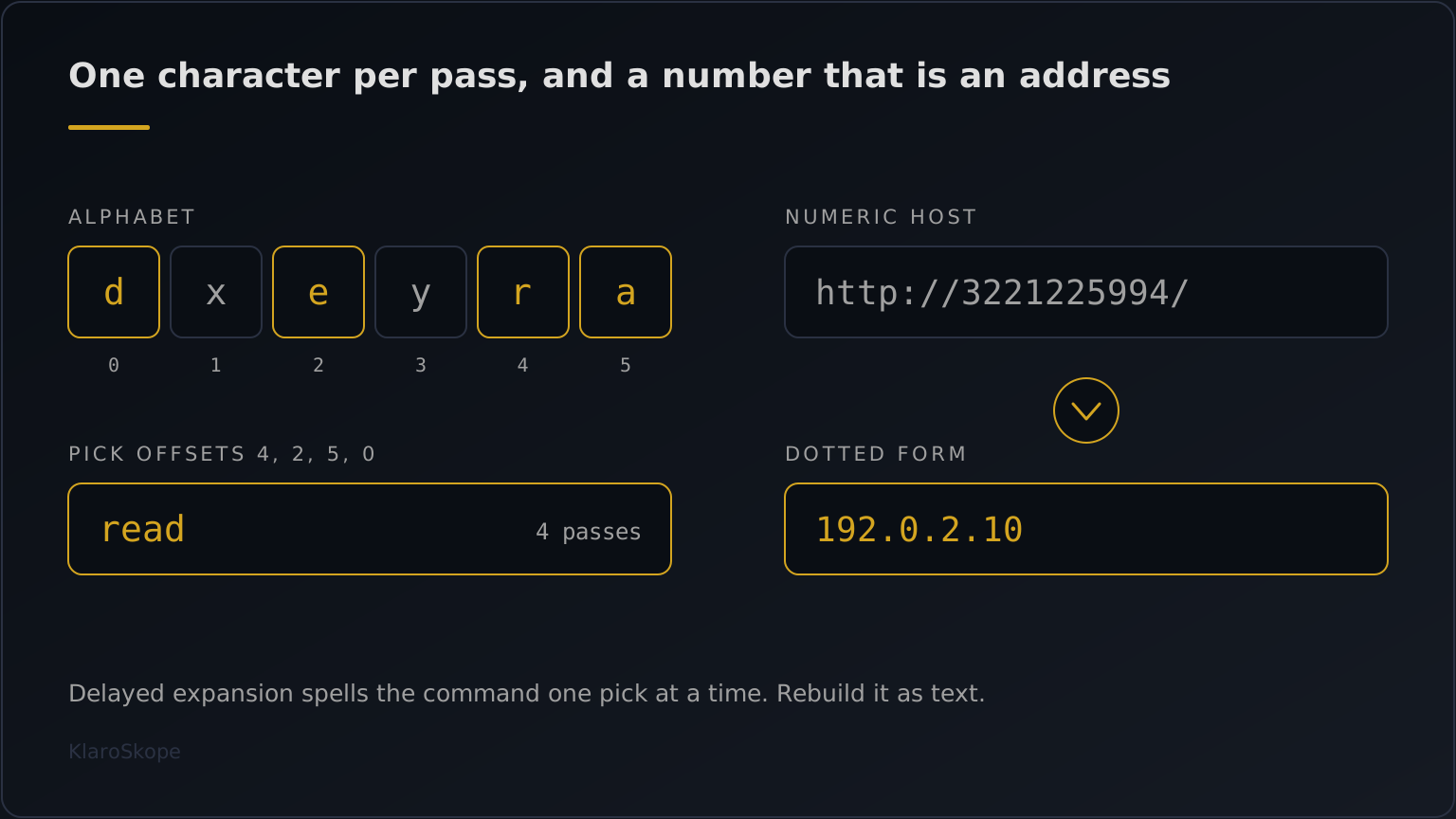
- An index list. A for loop walks a list of numbers. On each pass, !VAR:~N,1! reads one character of the alphabet at offset N, counting from 0, and set X=!X!... appends it to a growing variable. The order of the numbers is the order of the rebuilt text.
- Placeholder swaps. Characters that are awkward to keep in the alphabet are written as stand-ins and swapped back with !VAR:old=new!, which replaces each match and ignores case. Typical stand-ins cover spaces, double quotes, the && separator and a folder such as %TEMP%.
- A borrowed quote. Instead of carrying a double quote, the command can read one character of the shell's own command line with !CMDCMDLINE:~N,1!, at an offset where a quote sits. The offset depends on how the shell was launched, so the decoder here takes that character to be a double quote and says so in its note.
Read it by hand
Reading rules
-------------
1. Expansion  With /v:on, !NAME! is read when the line runs and %NAME% when
              it is parsed. Inside a loop, only the ! form sees new values.
2. Pick       !VAR:~N,1! is one character of VAR at offset N (0 is first).
              !VAR:~-2! is the last two; !VAR:~2,-1! starts at offset 2
              and stops one character before the end.
3. Append     set X=!X!... grows X by one piece per pass of the loop.
4. Swap       !VAR:old=new! replaces each match of old, ignoring case.
5. Quote      !CMDCMDLINE:~N,1! borrows one character from the shell's own
              command line, usually a double quote.
6. Hand-off   The rebuilt text goes to call, to a second cmd /c, or to
              PowerShell. That text is what to record and search for.
To do it by hand, write out the alphabet with the offset under each character, walk the index list, then apply the swaps in the same order as the command. A swap applied too early, or a %NAME% reference treated as delayed, produces a command the shell would not have run. The decoder above follows the same steps and reports how many loop passes and swaps it applied, so you can check its result against the paste.
Convert numeric hosts before you search
The rebuilt command often fetches its next stage from a URL whose host is a bare number rather than a name or a dotted quad. The Windows inet_addr function documents the accepted spellings: a single 32-bit integer, hexadecimal and octal parts, and short dotted forms (Microsoft Learn, inet_addr), and common download tools tend to accept them as well. A blocklist, a proxy log search or a threat intelligence lookup keyed on the dotted address will usually not match the integer spelling. A numeric host also skips DNS, so there is no lookup to pivot on. Convert the host first, then search for both spellings.
| Written as | Notation | Dotted form |
|---|---|---|
| 3221225994 | One decimal integer | 192.0.2.10 |
| 0xC000020A | One hexadecimal number | 192.0.2.10 |
| 0300.0.02.012 | Octal parts | 192.0.2.10 |
| 192.0.522 | Short dotted form, last part fills two bytes | 192.0.2.10 |
The table uses 192.0.2.10, an address reserved for documentation. When the decoder finds a numeric host in the rebuilt text it lists both spellings: the one the command used and the one your tools expect.
PowerShell -enc fallbacks
Some of these commands hand off to PowerShell with an -enc argument, the abbreviated form of -EncodedCommand, sometimes as a fallback that runs when the first download fails. The argument is base64 over UTF-16LE text. The decoder decodes those arguments where it finds them and checks the result for numeric hosts too, since a fallback can point at a different address from the first stage. For a standalone encoded argument, Decode PowerShell -EncodedCommand covers the switch and its abbreviations in more depth, and Decode Batch File Obfuscation covers carets and %var:~start,len% slicing in .bat files.
This tool does not execute anything. It reads the paste as text in your browser and lists the commands the expansion produces without running them. The paste leaves your browser only if you choose to run the full engine. For a command it cannot read, or a script with further layers behind the rebuilt command, submit it to the full engine.
Frequently Asked Questions
What is a ClickFix attack?
What does cmd /v:on do?
How do I read !VAR:~N,1! in a command?
Why is the host in the URL a long number?
Does this page run the command I paste?
What if the decoder cannot read my paste?
Continue Learning
Ready to decode?
Paste the script or upload the file. Multi-layer samples continue past this technique into whatever comes next.
Open the analysis console